Create Quotes. Send Invoices. Get Paid.
Everything your cleaning business needs to create professional quotes, convert them into invoices, and accept secure online payments — all from one simple platform.
Simple to learn, no lengthy onboarding, and not a bloated CRM — it works alongside the scheduling software you already use.
- 14-Day Free Trial
- No Credit Card Required
- Secure Stripe Payments
- Built for Cleaning Businesses
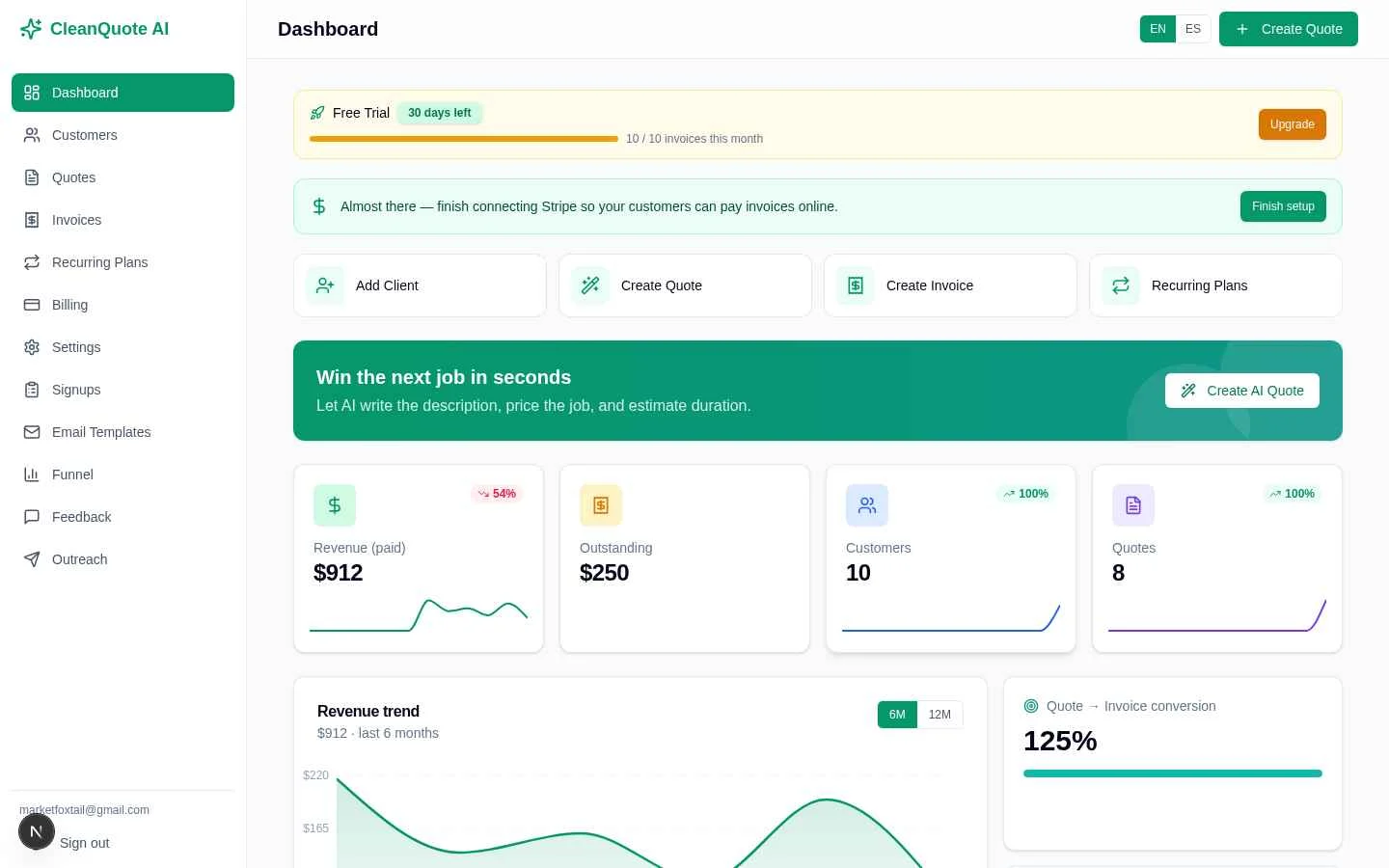
See the actual software
Everything from quote to payment — in one simple app
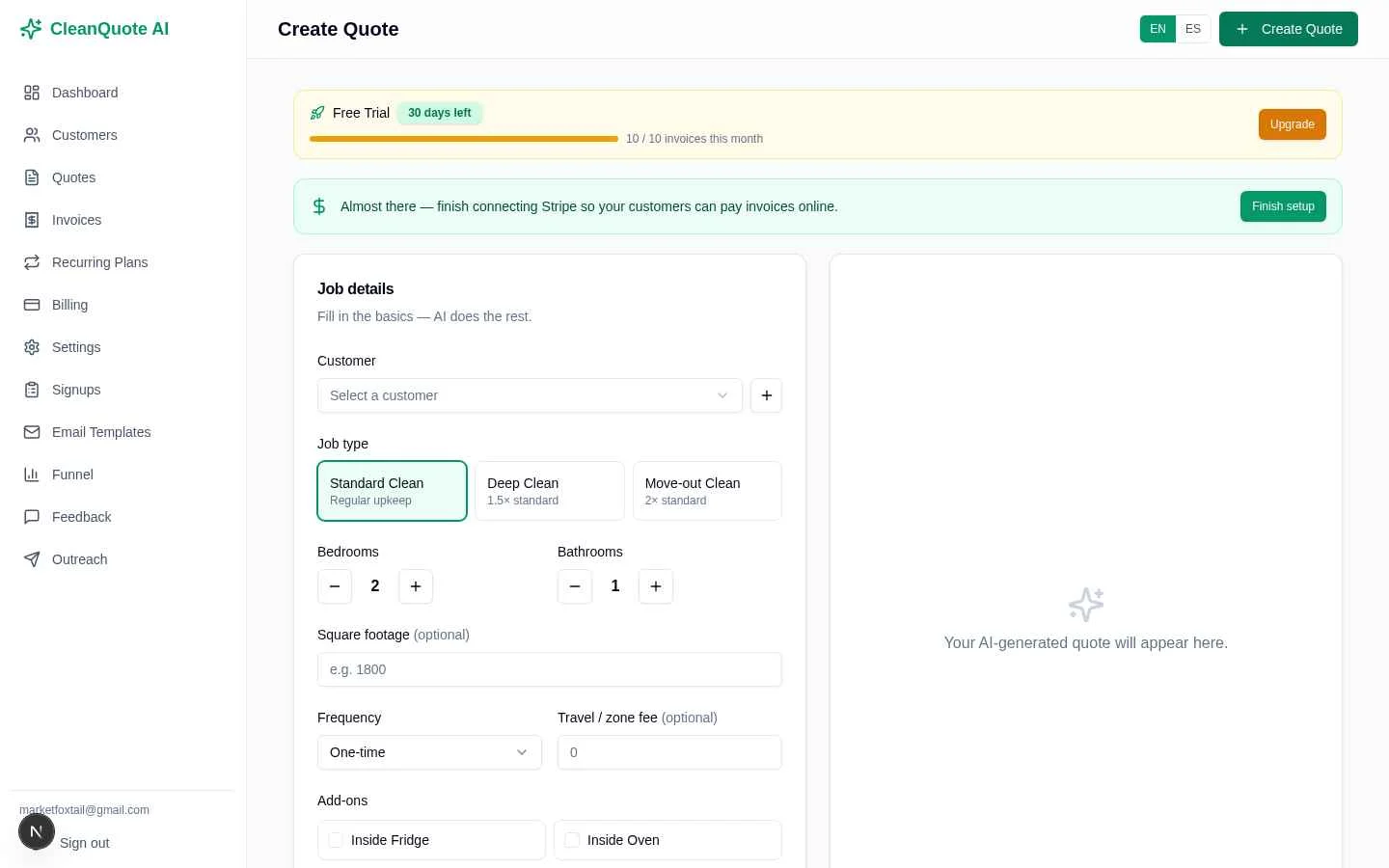
Build a quote
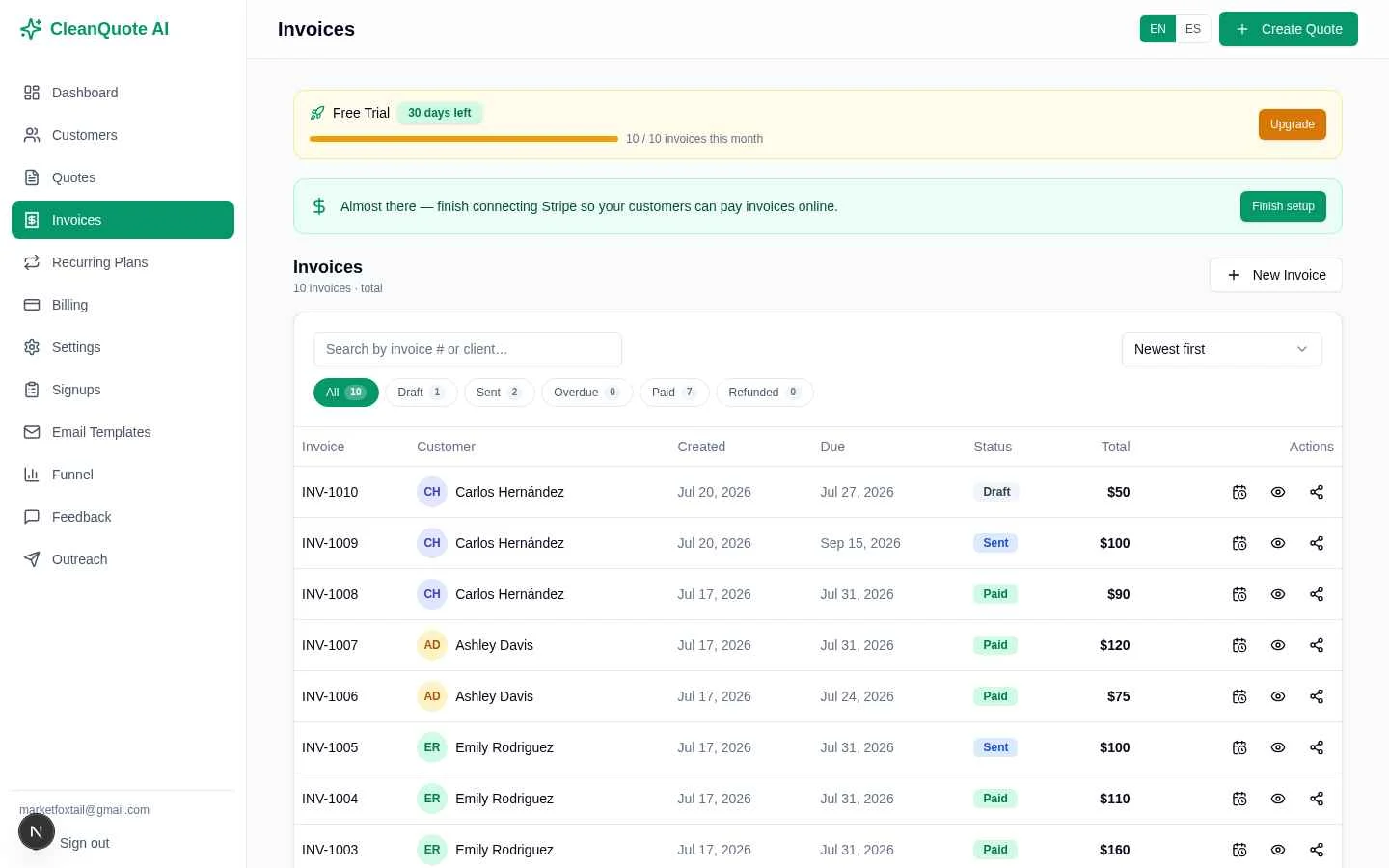
Send an invoice
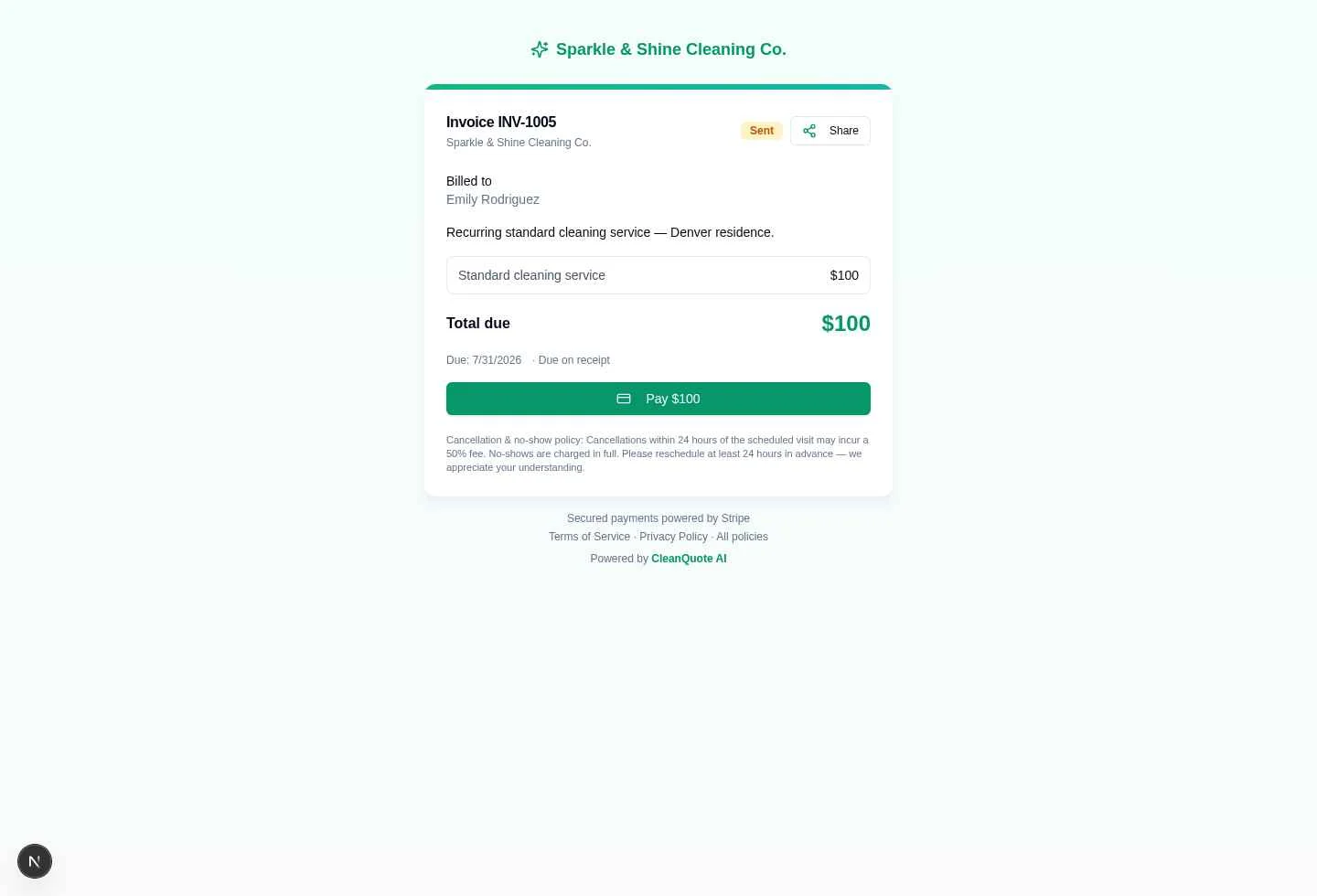
Get paid online
From driveway to deposit
Follow the same simple workflow on every job — and get paid faster.
Build a professional quote in seconds
Pick the customer, job type, rooms, and add-ons. CleanQuote AI writes the description, prices the job, and estimates duration — you just review and send.
- AI-written descriptions & upsells
- Itemized, fully editable pricing
- Works on your phone in the field
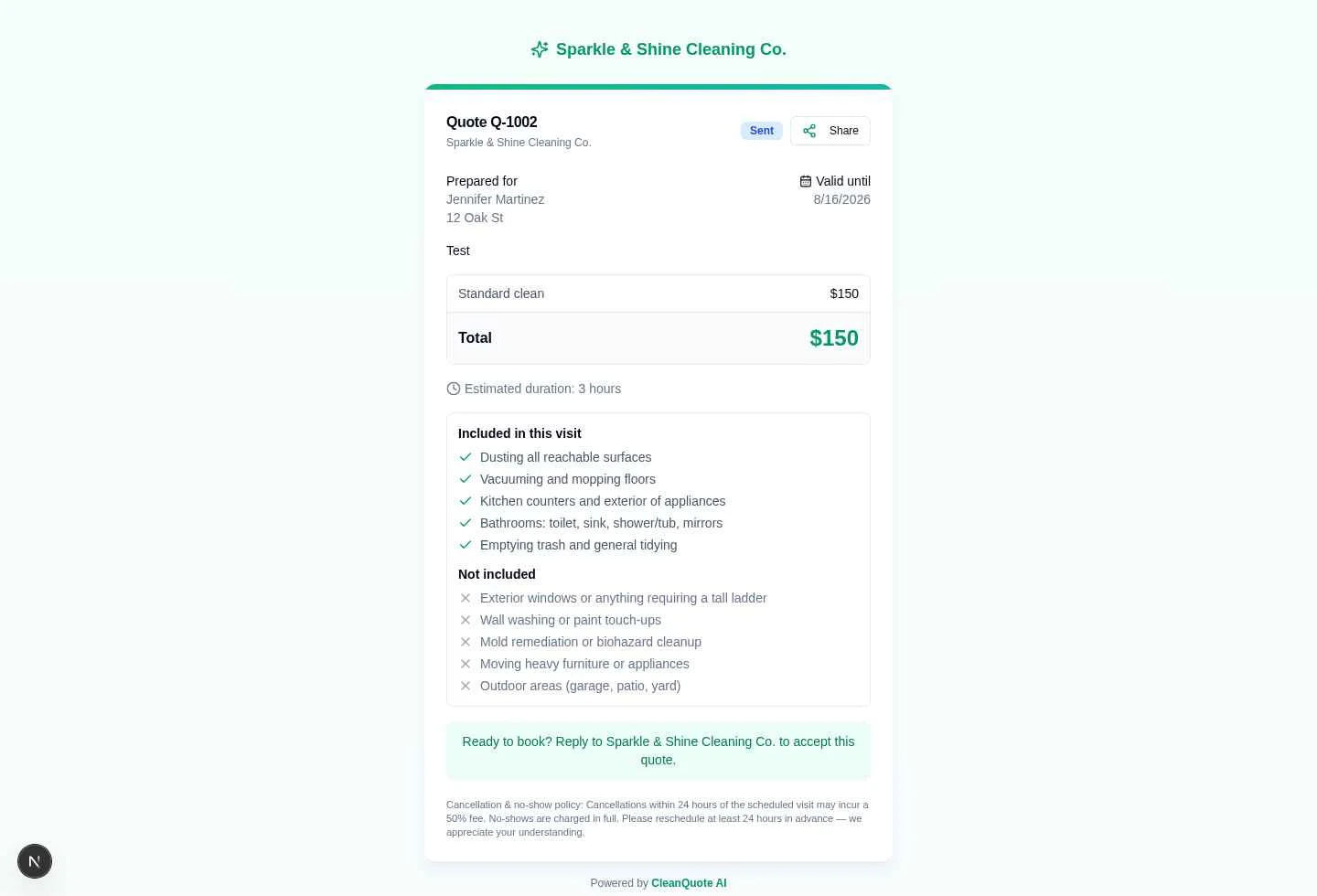
Customers review and accept online
Send a clean, branded quote your customer can open on any device. Clear inclusions, pricing, and duration mean faster “yes” — no back-and-forth.
- Polished, mobile-friendly customer view
- Clear inclusions & terms build trust
- Faster approvals, fewer questions
Convert accepted quotes into invoices
When a customer says yes, turn the quote into a branded invoice in one click. Track draft, sent, and paid at a glance so you always know where every job stands.
- One-click quote → invoice
- Automatic numbering & status tracking
- Professional, on-brand documents
Customers pay online in one tap
Send a secure payment link on every invoice. Customers pay by card through Stripe — you get paid faster, issue receipts automatically, and stop chasing checks.
- Secure card payments via Stripe
- Automatic payment receipts
- Full & partial refunds when needed
See revenue and get paid faster
Your dashboard shows revenue, outstanding balances, and quote-to-invoice conversion — so you can see what is working and grow with confidence.
- Revenue & outstanding at a glance
- Quote → invoice conversion tracking
- Profit-focused, not a bloated CRM
Earn more from every job
Give customers an easy way to recognize great service with built-in tipping. Enable or disable tipping and configure the tipping and processing-fee policies that fit your business.
- Turn tipping on or off anytime
- Percentage or custom tip options
- Choose your processing-fee policy
- Clear customer-facing payment breakdown
- Tips tracked separately from service revenue
- Actual Stripe fees reconciled after payment
Businesses should configure tipping and processing-fee policies according to their own legal and accounting requirements.
Close your books with less work
CleanQuote AI keeps the money side of every quote, invoice, payment, tip, refund, tax, discount, and processing fee organized automatically — so you spend less time gathering and reconciling numbers at the end of the month.
- Revenue itemized by transaction
- Taxes, tips & discounts separated
- Customer-paid vs business-absorbed fees
- Actual Stripe fees reconciled
- Refunds tracked separately
- Net deposits captured
- Legacy transactions clearly identified
- Any reporting period — preset or custom
Everything stays itemized from payment through export — less manual reconciliation, cleaner records, and an easier handoff to your accountant at month-end or year-end close.
CleanQuote AI helps you prepare cleaner, more organized financial data — it doesn’t replace your accountant or tax advisor.
How it works
Quick answers for new visitors — tap any question to see the steps.
How do I create a quote?+
- 1
Add the customer
Enter the customer’s basic information.
- 2
Describe the cleaning job
Choose the home details and service information.
- 3
Generate the quote
CleanQuote AI creates the professional quote — pricing, duration, and AI-generated job details.
How does tipping work?+
- 1
Enable tipping
Turn tipping on in Settings.
- 2
Choose your options
Configure percentage and/or custom tip options and your preferred fee policy.
- 3
Customer tips
Customers see tipping during payment and the tip is recorded separately from service revenue.
Businesses should configure tipping and processing-fee policies according to their own legal and accounting requirements.
See tippingHow do I get my accounting data out?+
- 1
Choose your period
Select a preset reporting period or enter a custom date range.
- 2
Review your numbers
Review revenue, taxes, tips, fees, refunds, outstanding balances, and net deposits.
- 3
Export
Download as CSV, Excel, PDF, or a QuickBooks-ready journal.
Everything you need to run the financial side of your cleaning business
See CleanQuote AI in Action
Watch how a cleaning business creates a quote, converts it into an invoice, and gets paid online in just a few minutes.
Not Another Complicated CRM
CleanQuote AI focuses on exactly what residential cleaning businesses need.
Not sure what to charge?
Use our free Cleaning Price Calculator to estimate any job by rooms, size, and add-ons in seconds — then turn it into a real quote.
Stop Managing Quotes in Word or Excel
Look more professional, save hours every week, and get paid faster.
Traditional Method
- Word documents
- Excel spreadsheets
- Manual pricing
- Handwritten invoices
- Chasing payments
CleanQuote AI
- AI-generated quotes
- Professional estimates
- One-click invoices
- Secure online payments
- Customer history
- Profit Analyzer
Why Cleaning Businesses Choose CleanQuote AI
Create Quotes in Minutes
Generate professional AI-powered quotes in seconds.
Get Paid Faster
Accept secure online payments directly from your invoices.
Know Your Profit
See estimated costs and margins before sending every quote.
Built for Cleaning Businesses
Not a complicated CRM — just the tools cleaning companies actually need.
Loved by cleaning business owners
Simple, fast, and built for the way cleaning companies actually work.
“I send a polished quote before I even leave the customer’s house — and half of them pay the same day. It paid for itself in a week.”
“No more Word documents at 10pm. Quotes take a minute, invoices are one click, and I finally look as professional as the big companies.”
“Being able to quote and invoice in Spanish for my clients is huge. Simple to learn, nothing I don’t need — exactly what a small crew wants.”
Illustrative examples from cleaning business owners.
One simple platform. Everything in view.
Quotes, invoices, payments, and revenue — all in one clean dashboard built for cleaning businesses. No clutter, no complex setup.
Create Your First QuoteEverything You Need to Quote, Invoice & Get Paid
Start free for 14 days. Pick the plan that matches how many invoices you send. Save 2 months with annual billing. Cancel anytime.
No hidden fees•No credit card to start•Cancel anytime
Need full details? Compare all plans →
How CleanQuote AI compares
The simple, affordable alternative to bulky, one-size-fits-all software.
What Can We Build for You?
We’re building CleanQuote AI with cleaning businesses, not just for them. Tell us what would make your business easier to run.
How important would these features be to your business?
Rate each feature independently — more than one can matter at the same time.
0 = Not needed · 3 = Useful · 5 = Critical
Is there something else you’d like us to build? Tell us what you need.
Your feedback helps guide what we build next. We can’t promise that every request will be built or give a specific timeline.
Frequently asked questions
Is CleanQuote AI a CRM?+
No. CleanQuote AI is focused quoting, invoicing, and payment software for cleaning businesses — nothing bloated to configure. There is no steep learning curve, so you can send professional estimates the same day you sign up.
How long does setup take?+
Minutes. Create an account, add your business name, and you can send your first quote right away. There is no lengthy onboarding and no special software or hardware required.
Do I need a credit card to start?+
No. Every account starts with a 14-day free trial and no credit card is required. You can subscribe to a paid plan anytime during or after your trial.
Can my customers pay online?+
Yes. CleanQuote AI uses Stripe to securely process card payments. You send a payment link on the invoice and your customer pays online — funds go to your connected Stripe account.
Does it work in Spanish?+
Yes. The interface, quotes, invoices, and emails are fully bilingual in English and Spanish, and you can set a preferred language for each customer.
Will it replace my scheduling software?+
No — it works alongside the scheduling tools you already use. CleanQuote AI handles estimating, invoicing, and getting paid, so you can keep your current calendar or scheduling app.
How much does it cost?+
Plans start at $15/month (Starter, up to 10 invoices) and scale to $99/month (Enterprise, 101–500 invoices). Save two months with annual billing. See the pricing page for full details.
Can my cleaning customers leave a tip?+
Yes — if you enable tipping. When it is turned on, customers can add an optional tip while they pay online, and the tip is recorded separately from your service revenue so your numbers stay clear. Tipping is always optional and fully under your control.
Can I choose how tipping works?+
Yes. In Settings you can turn tipping on or off, offer preset percentages and/or a custom amount, and select your preferred processing-fee policy. You should configure these options to match your own business, legal, and accounting requirements — CleanQuote AI does not determine what is legally required for your business, so check with your accountant or advisor if you are unsure.
Who pays the processing fees on tips?+
That depends on the fee policy you choose. CleanQuote AI supports different policies — for example, the business absorbing the fees or passing certain tip-related processing fees along — and it records each component separately so your books stay clear. Pick the policy that fits your business and confirm the right approach with your accountant.
Can I export my accounting transactions?+
Yes. Accountant Mode lets you choose any reporting period and export your itemized transactions — revenue, taxes, tips, discounts, processing fees, refunds, and net deposits — as CSV or Excel, so you spend less time gathering and reconciling numbers.
Does CleanQuote AI work with QuickBooks?+
Yes. Alongside the standard CSV and Excel exports, you can download a QuickBooks-ready journal file to import. It is structured as balanced accounting entries so revenue, tips, taxes, fees, and refunds stay itemized. We are not affiliated with QuickBooks, and you should always review imported data with your accountant.
Can I give my accountant the reports?+
Yes. You can download a professional Accounting Summary PDF for any date range, plus CSV, Excel, and QuickBooks-ready files, so it is easy to hand organized records to your accountant. These reports are a management summary to make month-end and year-end easier — they are not a formal financial statement or a tax filing.
Still have questions? Try it free for 14 days — no credit card required.
Start Free TrialReady to Win More Cleaning Jobs?
Start creating professional quotes in minutes.
14-Day Free Trial • No Credit Card Required